|
More On High Quality Video Calling
TV
TechCheck
of March 9, 2009 reported on a new technique for electronic
newsgathering (ENG) using video calling over broadband Internet.
NAB put the technology to the test at the Broadcast Engineering
Conference (BEC) in April when a speaker, Thomas Ray of Buckley
Radio, was unable to travel to Las Vegas for the event. By using
a live video link with Skype technology, Tom was able to present
his paper on An AM Directional Antenna and HD Radio from his home
in New York.
We can report
that the video and audio quality was excellent, including two-way
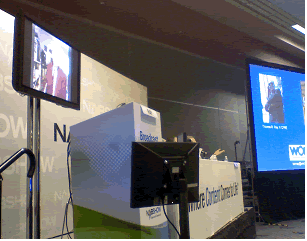
audio communications with low-latency. The pictures below show
the set-up for the presentation in the conference room.

 The following update on using video calling for broadcast has
been written for TV TechCheck by Julian Spittka of Skype
Audio/Video Group, who presented the paper on high-quality video
calling at the BEC.
The following update on using video calling for broadcast has
been written for TV TechCheck by Julian Spittka of Skype
Audio/Video Group, who presented the paper on high-quality video
calling at the BEC.
Introduction
In today's broadcasting world, whether it is news, game or shopping
shows, all of these programs often include talent and guests from
all over the world. Until recently, this sort of acquisition has
been done with special ENG trucks or guests had to travel to studios.
However, several factors limit traditional ENG:
1. Availability:
ENG trucks or studios are not always available where news is
happening.
2. Interactivity: A traditional ENG connection is not a very
interactive way of communicating. The connection to the studio
is half-duplex and often, especially in the case of satellite
connections, latency is high. Reporters have to be trained and
live interviews are difficult.
3. Cost: The cost of an ENG truck is in many cases prohibitively
high. Also, sending talent to the location is inconvenient and
expensive.
In those cases,
traditional ENG can be complemented by high quality Internet video.
What is
Internet High Quality Video Calling?
A high quality video calling application like Skype allows broadcasters
to make a high quality video call from any location where a broadband
Internet connection is available. There simply needs to be two
end-points that are talking to each other and the data is exchanged
via the Internet.
There are
four elements required for making a high quality video call:
1. A fast
and properly configured computer.
2. An appropriate network setup.
3. A good audio setup.
4. A good video setup.
Computer
Hardware
Choosing the right computer hardware is fairly straightforward.
The video processing algorithms demand the right resources. Therefore,
the computer should have a fast CPU with sufficient memory to
allow enough margins for low latency, high quality video calls.
Most computers available at electronics stores have sufficient
speed and memory to support Skype video calls.
To further
optimize the video call quality, it's important to disable all
personal firewalls, the virus scanner and similar options for
the duration of a call as these software elements can introduce
additional latency and jitter to the data stream. The same is
true for other software that accesses the Internet or impairs
the computer's performance.
Network
Setup
The computer that runs a high quality video call requires access
to sufficient broadband network speed. Skype recommends testing
the PC's connection speed via a site like www.speedtest.net.
For a high quality video call the network bandwidth should be
greater than 400 kbps and for an audio-only call, it should be
about 50 kbps. Within the application, audio and video are sharing
the network resources. Skype has invested significant resources
over the last few years to accurately estimate the available network
resources on the network and to find a good trade-off for allocating
them for audio and video. In addition, we are constantly improving
our algorithms. Just recently, Skype announced a new speech codec
called "SILK" that reduces the network bandwidth requirement
by up to 50 percent while improving the speech quality at the
same time.
Again, everything
that could impair the data stream should be removed. Typical impairments
include WiFi, firewalls and some restrictive NATs. A firewall
can make it necessary for the data traffic to be routed through
a proxy which limits the throughput and increases latency. The
best broadband Internet connection is worthless when it's slowed
down this way.
In summary,
a poor network setup can lead to higher latency, lower video resolution
and frame rates, as well as audio distortion.
Audio Setup
Skype uses high fidelity speech that makes a call much more natural
and more intelligible when compared to traditional telephones.
The aforementioned speech codec, "SILK," increases the
audio sampling frequency from 16 kHz to 24 kHz.
Skype calls
can also be made hands-free. This way, callers can speak naturally,
similar to an in-studio conversation. To ensure that hands-free
video calls are broadcast- quality, be sure to use a microphone
and high quality speakers, preferably USB, as they prevent the
audio from picking up noise and hum from the computer. Also, background
noise like fans and humming from a refrigerator, TV or similar
electronic devices should be eliminated, as it makes the algorithms
that cancel out the echo from the microphone signal less efficient.
Improper audio
set-up with high quality Skype video calling can lead to two problems:
1. Audio
Fading or Drop-Outs: the audio from the side speaking the loudest
will come through, while the other party's audio cuts out. The
conversation becomes more difficult, as the side that is loudest
does not notice when the other side tries to speak.
2. Residual Echo: as anyone who has ever experienced residual
echo can attest, trying to speak while hearing your voice's
echo is extremely frustrating.
To ensure
proper audio setup, a good practice is for each side to ask the
other about the audio quality during advance testing.
Video Setup
The video setup for a high quality Skype video call is simple,
as there are not that many components that interact with each
other. However, it is important to keep in mind that video resolution
and frame rate are adaptive. Mostly, they adapt to the available
network bandwidth but there are a few things that can affect it
and require your attention.
For a high-quality
video call, you will need a camera that supports at least VGA
(640x480) resolution and a frame rate of 30 frames per second.
There are a number of options for low-cost consumer Webcams available
from various manufacturers, but a high-end DV camera can be used
just as well.
Additionally,
even though a caller might be far away, don't forget the basics.
Video quality can be improved by good lighting and proper framing
of the remote caller. The remote caller should also avoid wearing
clothing with bold patterns.
Integrating
High Quality Video Calling Into a Broadcast
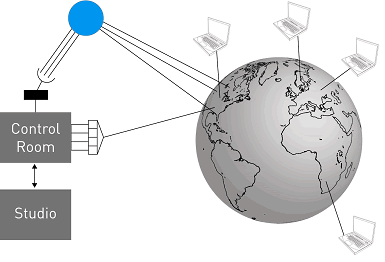
High quality video callers can be located anywhere in the world
where a broadband Internet connection is available. Callers connect
to the studio via high quality Internet video calling and for
every remote caller, there needs to be a high quality video client
running at the studio.
The control room receives all the video and audio streams and
can integrate them into the program, just like any other video
or audio source from the studio. Also, the control room can choose
to send any video or audio source back to the remote caller, including
mixing together several remote callers. The studio then becomes
a conference mixer for both video and audio and provides the correct
mix to the remote callers.

Skype Kits
 We
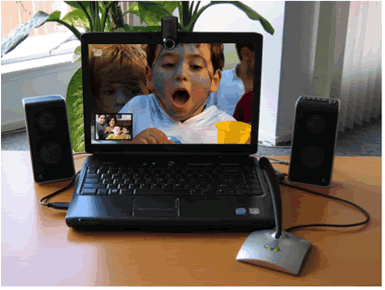
have found that an easy way to ensure high quality setup is by
using "Skype Kits." A Skype Kit contains everything
needed for a high quality video call and can physically be sent
to remote callers: a laptop, high quality video Webcam, microphone
and speakers. This way all the unknowns, except for the Internet
broadband connection, are removed and the only thing that needs
to be screened in advance is the network connection. We
have found that an easy way to ensure high quality setup is by
using "Skype Kits." A Skype Kit contains everything
needed for a high quality video call and can physically be sent
to remote callers: a laptop, high quality video Webcam, microphone
and speakers. This way all the unknowns, except for the Internet
broadband connection, are removed and the only thing that needs
to be screened in advance is the network connection.
Key Take-Aways
To summarize:
1. High
quality video calling allows news gathering worldwide using
a broadband Internet connection.
2. High quality video calling is a robust and effective technology.
3. Deployment is simple; Skype Kits can easily be shipped anywhere
in the world.
Additional
Benefits of Using Skype for Broadcasting
For broadcasters integrating high quality video, Skype offers
a community of 443 million registered users from which to recruit
guests. Broadcasters can also complement traditional ENG by using
SkypeOut calls (calls from a Skype client to a non-Skype client
that typically cost 2.1 cents per minute) to save money on PSTN
calls.
Where Will
High Quality Video Calling Go From Here?
Technology is evolving and so are computers which will become
more powerful and affordable. Likewise, networks will become faster.
As a result, we will see higher resolution video, higher frame
rates and crisper, more natural audio. It will become easier to
run multiple channels of video and mix them together.
We are just
at the beginning of high quality video calling. It's a fairly
new, but proven technology and more features and improvements
can be expected for TV programs in the near future.
In addition,
Skype in high definition is now available for testing. Currently,
Skype can deliver up to 720p resolution. The actual resolution
and frame rate is highly dependent on the resources available.
We achieved the highest resolution when we used the following
test configuration:
1. High-end
Sony HD camera.
2. High-definition-specific capture card.
3. Quad-core PC, which may provide more power than needed; we
are still defining the exact requirements.
4. An excellent network connection of at least 500 kbps.
High definition
video calling is available in the latest Skype 4.0 for Windows
client. We believe the video call quality is so good that we currently
equip some of our own conference rooms with it so we can gather
feedback to further enhance the Skype platform. The move to high
definition video sharing is a big step forward for Skype and will
help to further enhance broadcast ENG.
For More
Information
To learn more about using Skype in broadcast, please visit the
Skype Website at: http://skype.com/media/broadcast
 NAB
Satellite Uplink Operators Training Seminar NAB
Satellite Uplink Operators Training Seminar
October 5 - 8, 2009 Washington, DC
This four-day course is designed to instruct about uplink operational
practices, which minimize the risk of satellite transmission interference.
This is an important course since the FCC rules require that a
trained operator be present at all times during transmissions,
either an earth station site or designated remote control point.
Go to the http://www.nab.org/satelliteSeminar/
or Contact NAB Science & Technology Department at (202) 429-5346
or ccolerid@nab.org for
information about the NAB Satellite Uplink Operators Training
Seminar. If you are interested in sponsorship opportunities for
this event contact NAB Advertising at (800) 521-8624 or advertising@nab.org.

The
June 1, 2009 TV TechCheck is also available in
an Adobe Acrobat file.
Please click
here to read the Adobe Acrobat version of TV TechCheck.
|