|
RDS
Tagging
In
September 2007, iBiquity Digital Corporation, developers of the
HD Radio in-band/on-channel digital radio system, announced the
roll-out of “iTunes tagging” technology, providing radio
listeners who have iPods a new, easy way to purchase songs they
hear on the radio. iTunes tagging relies on the data broadcasting
capabilities of the HD Radio system, which make it possible for
broadcasters to send a unique numerical identifier to receivers
along with every song, as well as the song title and artist information
which listeners can see on the receiver’s display.
Now,
a similar capability has been developed for analog FM radios utilizing
the Radio Data System (RDS) data subcarrier used by many broadcasters
to broadcast song title and artist information to RDS-capable
receivers. Called “RDS tagging,” Microsoft last month
announced that Zune portable media players, which have built-in
FM receivers, will support RDS tagging and that users will be
able to tag songs they hear on their Zune FM radios for purchase
(a copy of the Microsoft press release is available on the Zune
Web site at www.zune.net/en-us/press/2008/0908-fall2008.htm).
According
to press reports, nine broadcast groups have indicated their intention
to broadcast RDS tagging information: 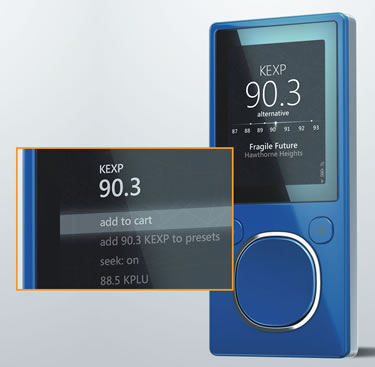 Beasley,
Bonneville, CBS Radio, Citadel, Clear Channel Radio, Cox Radio,
Emmis, Entercom and Greater Media. Clear Channel was the first
on-the-air with RDS tags, on over 450 stations. So far, only the
Zune device can make use of RDS tagging information but other
devices are under development. Beasley,
Bonneville, CBS Radio, Citadel, Clear Channel Radio, Cox Radio,
Emmis, Entercom and Greater Media. Clear Channel was the first
on-the-air with RDS tags, on over 450 stations. So far, only the
Zune device can make use of RDS tagging information but other
devices are under development.
One
of the newest Zune players is shown in the photograph, operating
in FM receiver mode, and demonstrating how this new capability
looks. When a listener hears a song they want to tag (note the
song title and artist information on the Zune display, beneath
the tuner “dial”) they press the large button and the
display changes to what is shown in the inset. The first choice
on this new display is “add to cart” and when selected,
the song is “tagged.”
If
the Zune is within range of a Wi-Fi Internet connection, then
the song can immediately be purchased and downloaded into the
player. This particular capability was recently demonstrated at
The NAB Radio Show and the entire process, from hearing and tagging
the song, to purchasing it then downloading it, was actually completed
before the selected song had finished playing on the radio! If
there is no Wi-Fi network available, then tagged songs can be
purchased the next time the Zune is connected to the Internet
through a PC.
RDS
tagging makes use of an RDS feature called “Open Data Application”
(ODA). RDS tagging is just one of many ODAs (a list of ODAs is
available on the National Radio Systems Committee Web page at
www.nrscstandards.org/RBDS/RDS%20ODA%20AIDs.pdf).
A code (“the ODA ID“), unique to the RDS tagging ODA,
is included in the broadcast RDS data stream; when an FM radio
that supports RDS tagging receives this code, it knows that song
tag information will follow. Zune players sold from this point
forward will all have the RDS tagging technology included, and
Microsoft has released a software update for earlier models of
Zune which will upgrade those earlier models with RDS tagging
functionality (this update is available online at www.zune.net/en-us/products/zunesoftware/download.htm).
These
RDS tagging receivers also make use of a new RDS feature called
"RadioText Plus" which is an enhancement to the RadioText
feature that is often used by broadcasters for sending song title
and artist information over an RDS subcarrier. RadioText Plus
allows the receiver to "understand" the information
being sent in a RadioText message by identifying specific portions
of the RadioText message as individual objects. This will allow
receivers to implement advanced display features which, for example,
can consistently place song title and artist information in a
particular place on the display, or allow for a more seamless
transition between RDS and HD Radio displays in HD Radio receivers
which are blending between analog and digital.
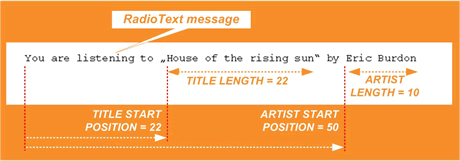
An example
of how RadioText plus is used to identify objects, taken from
the RadioText specification, is shown in the diagram below for
the RadioText message "You are listening to 'House of the
Rising Sun' by Eric Burdon." The
RadioText Plus information corresponding to this message would
identify two objects, song title and artist, by the start position
and length (in number of characters) of each object (as shown
in the figure). RadioText Plus is currently being incorporated
in the European RDS Standard (IEC 62106, maintained by the International
 Electrotechnical
Commission, Geneva, Switzerland, www.iec.ch),
and the National Radio Systems Committee (NRSC, www.nrscstandards.org)
is expected to incorporate it into the U.S. version of the RDS
Standard, NRSC-4 (called the “U.S. RBDS Standard”) in
2009. Additional information about RadioText Plus is available
in an EBU Technical Review article entitled “RadioText Plus:
a new enhancement to the RDS RadioText Service,” online at
www.ebu.ch/en/technical/trev/trev_307-radiotext.pdf. Electrotechnical
Commission, Geneva, Switzerland, www.iec.ch),
and the National Radio Systems Committee (NRSC, www.nrscstandards.org)
is expected to incorporate it into the U.S. version of the RDS
Standard, NRSC-4 (called the “U.S. RBDS Standard”) in
2009. Additional information about RadioText Plus is available
in an EBU Technical Review article entitled “RadioText Plus:
a new enhancement to the RDS RadioText Service,” online at
www.ebu.ch/en/technical/trev/trev_307-radiotext.pdf.
 The
FCC Adopted Computer Modeling for The
FCC Adopted Computer Modeling for
AM Antenna Proof of Performance on September 24, 2008
Attend NAB's AM Antenna Computer Modeling Seminar and Learn How
Computer
modeling for AM Antenna proof of performance was adopted by the
FCC on September 24. To learn the basics needed to utilize modeling
software, such as MININEC and nodal analysis – used for designing
performance-optimized AM directional antenna phasing and coupling
systems and proving the performance of directional antenna patterns
–- plan on attending NAB’s AM Antenna Computer Modeling
Seminar in Washington, D.C. November 20 and 21.
You
will learn about:
Moment
Method Modeling Basics
DA
Proofing Using Moment Method Modeling
Overcoming
Limitations of Using Field Strength Measurements for DA Proofs
State
of the Art in Phasing System Design Nodal Analysis of AM DA
Phasing and Coupling Systems
Pattern
Design Considerations for Optimum Performance
AM
antenna experts Ron Rackley and Ben Dawson, along with antenna
modeling software specialist Jerry Westberg, will lead the seminar
demonstrating how moment method modeling makes analysis of actual
tower current distributions possible and how a model can be used
to proof an array provided the proper criteria are considered.
All instructors are well known in the radio industry as experts
in the field of directional antenna design and maintenance. Their
decades of experience offer station engineers an opportunity to
learn techniques, tips and tricks that can be immediately useful.
Seminar
fee: $395.00 (NAB members) and $495.00 (non-members). For
more information on the curriculum, how to register or housing
go to AM
DA Seminar on the NAB Web site or call Sharon Devine at (202)-429-5338.
Register now for the NAB AM Antenna Computer Modeling Seminar!
Share
Your Expertise with Your Fellow Engineers
Deadline Extended for 63rd NAB Broadcast Engineering Conference
Call for Papers
 The
NAB Show will host the 63rd NAB Broadcast Engineering Conference
(BEC) on April 18 - 23 at the Las Vegas Convention Center in Las
Vegas, Nev. This world-class conference addresses the most recent
developments in broadcast technology and focuses on the opportunities
and challenges that face broadcast engineering professionals around
the world. The BEC is a highly technical conference where presenters
deliver technical papers ranging over a variety of topics relevant
to the broadcast and allied industries. We invite you to submit
a proposal to present a technical paper at our conference. The
deadline for submitting your proposal is October 27, 2008. The
NAB Show will host the 63rd NAB Broadcast Engineering Conference
(BEC) on April 18 - 23 at the Las Vegas Convention Center in Las
Vegas, Nev. This world-class conference addresses the most recent
developments in broadcast technology and focuses on the opportunities
and challenges that face broadcast engineering professionals around
the world. The BEC is a highly technical conference where presenters
deliver technical papers ranging over a variety of topics relevant
to the broadcast and allied industries. We invite you to submit
a proposal to present a technical paper at our conference. The
deadline for submitting your proposal is October 27, 2008.
To
submit a technical paper proposal, click
here and complete the electronic form. If you have questions
regarding the NAB Broadcast Engineering Conference, please contact
John Marino.

The October 20, 2008 Radio TechCheck is also available
in an Adobe Acrobat file.
Please
click
here to read the Adobe Acrobat version of Radio TechCheck.
|
