|  |  |

|
Getting the Most Out of RDS Technology
The first paper, “Maximizing the Use of RDS Bandwidth,” was authored by Tony Peterle, technical support manager, Worldcast Systems, Inc. Here is a brief overview of Tony’s paper: INTRODUCTION – though it has been in use since the 1980s, the Radio Data System (RDS) has recently seen a surge in interest and deployment by a growing number of broadcasters, particularly in the U.S. There are several reasons for this increase, but much of it can be attributed to the rising popularity of data services such as the broadcast of traffic data to RDS equipped navigation systems, emergency alerting and messaging services, and sending specifically structured song information to receivers that allows the user to “tag” the song for later purchase. This paper gives a cursory explanation of the various data services that are most often deployed on an RDS subcarrier. Then it explores the challenges of hosting multiple data services, and some data management and other techniques to help analyze and maximize the performance of the entire RDS system. WHAT IS RDS? – RDS uses a 57 kHz subcarrier on an FM broadcast signal to deliver low bit-rate (about 1200 bits/sec) data to RDS-equipped radio receivers. The data is transmitted using bi-state phase shift modulation on the subcarrier (which is suppressed). RDS data is arranged in distinct data “groups”. Each group is 104 bits in length, and contains binary data divided into 4 “blocks” of 26 bits each. There are 16 different types of RDS data groups, and many of them have been reserved, or assigned, to a particular type of data or data service.
MEASURING AND MONITORING RDS PERFORMANCE – there are many tools a broadcaster can use to check the signal level, error rate and the data received from a broadcast RDS signal. Poor signal and interference can cause problems with any RDS service, even if the configuration of the encoder is perfect. Once the delivery pathway has been confirmed, the best way to judge RDS performance is from the perspective of a user: is your RT+ receiver decoding the artist and title data to tag the song in a reasonable amount of time? How does the scrolling PS look (on a variety of receivers)? Are traffic incidents, emergency messages and other RDS data being delivered in a timely manner? The second paper, entitled “Understanding and Optimizing RDS for a New Generation of Receivers,” was written by Alan Jurison, a broadcast engineer with Citadel Broadcasting in Syracuse, N.Y. In this paper Alan shares some of his experience from many years of working with RDS: INTRODUCTION – in the early 2000s, major automobile manufacturers in the U.S. started including RDS as a feature on many of their factory installed radios. In the past few years, manufacturers have improved on these early designs to include multi-colored, larger display touch screens for configuration, GPS navigation and viewing of DVD or other videos. Luckily for radio, they have been able to improve the RDS experience to the end-user with these newer designs. Within the past year and a half, exciting new portable receivers with RDS support have entered the marketplace with the introduction of the Insignia NS-HD01 and NS-HD02, Motorola Droid X, Microsoft Zune HD and Apple’s iPod fifth and sixth Generation Nano players. These exciting new receivers are renewing interest among broadcasters with their RDS support. CONFUSION BETWEEN PS AND RT – Because Program Service (PS) and RadioText (RT) are completely different fields in the RDS Standard, they are treated differently by each receiver. I frequently have talked with someone in radio who gets these two fields confused. I have found this confusion is related to the receiver the person is using to look at RDS. Take the Denon TU-1500RD, a popular 19” rack mount tuner used at radio stations as an inexpensive way to monitor RDS data. The RT display on the Denon does not support a full 64 characters, and so the receiver scrolls the RT on the display to make it fit. Many people have confused this with a dynamic PS’s “scrolling” or “framing” effect. While the general listening public does not necessarily need to know what they are looking at (PS or RT), those of us in radio need to pay attention and understand how both fields relate to the end-user experience. I encourage you to try a variety of RDS enabled radios to understand the various user experiences our listeners have depending on the radio they are listening to. It is important to know that there are newer radios that support RT equally, if not better than they do of the PS.
DATA AND SONG TIMING – for stations that are running a delay, whether it be for HD Radio signal transmission and/or for profanity, be sure to make adjustments in your RDS display delay. Some hardware and software products on the market have this ability, and it is best that you research this and spend some time “fine tuning” it. If you ignore this, it is possible that a song’s data could show up before the song is on the air. If you are going into another song, the next song’s data can be displayed for a period of time while the previous song is still playing, which is also an issue. These papers are included in their entirety in the 2011 NAB Broadcast Engineering Conference Proceedings, available on-line from the NAB Store. For additional conference information visit the NAB Show web page. |
 The
Radio Data System (RDS) FM digital subcarrier is an important tool
for radio broadcasters that has seen an increase in popularity and
usage in recent years. Two papers presented at this year’s
NAB Broadcast Engineering Conference (BEC, April 9-14, 2011, Las
Vegas, NV), excerpted here, provide valuable insight into how broadcast
engineers can help their stations get the most out of this technology.
The
Radio Data System (RDS) FM digital subcarrier is an important tool
for radio broadcasters that has seen an increase in popularity and
usage in recent years. Two papers presented at this year’s
NAB Broadcast Engineering Conference (BEC, April 9-14, 2011, Las
Vegas, NV), excerpted here, provide valuable insight into how broadcast
engineers can help their stations get the most out of this technology.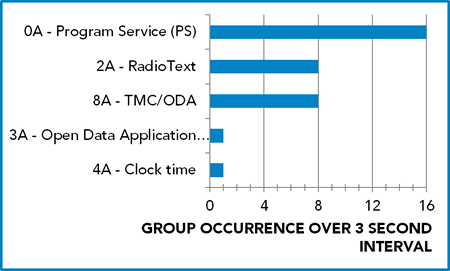 CONTROLLING
DELIVERY OF RDS DATA – Managing the RDS bandwidth is really
all about controlling the distribution of data across the various
different RDS data groups. In most RDS encoders, this management
is accomplished by changing the “group sequence.” This
is literally a sequence of RDS groups that the encoder will follow
when broadcasting RDS data. Here is a sample of a typical RDS group
sequence (since RDS can only broadcast about 11 groups per second,
this sequence represents about three seconds of data): 0A 2A 0A
8A 0A 2A 0A 8A 0A 2A 0A 8A 0A 2A 0A 8A 0A 2A 0A 8A 0A 2A 0A 8A 0A
2A 0A 8A 0A 2A 0A 8A 3A 4A . The number of each group type occurring
in this 3 second interval are shown in the graph. Note the presence
of 8A and 3A groups, indicating that this station is most likely
carrying TMC traffic messages. There are also 0A groups for the
PS and 2A groups for the RadioText. Also note that not all RDS encoders
allow the broadcaster to control the group sequence, but in general
the encoders that can handle these types of data broadcasts will
have this function.
CONTROLLING
DELIVERY OF RDS DATA – Managing the RDS bandwidth is really
all about controlling the distribution of data across the various
different RDS data groups. In most RDS encoders, this management
is accomplished by changing the “group sequence.” This
is literally a sequence of RDS groups that the encoder will follow
when broadcasting RDS data. Here is a sample of a typical RDS group
sequence (since RDS can only broadcast about 11 groups per second,
this sequence represents about three seconds of data): 0A 2A 0A
8A 0A 2A 0A 8A 0A 2A 0A 8A 0A 2A 0A 8A 0A 2A 0A 8A 0A 2A 0A 8A 0A
2A 0A 8A 0A 2A 0A 8A 3A 4A . The number of each group type occurring
in this 3 second interval are shown in the graph. Note the presence
of 8A and 3A groups, indicating that this station is most likely
carrying TMC traffic messages. There are also 0A groups for the
PS and 2A groups for the RadioText. Also note that not all RDS encoders
allow the broadcaster to control the group sequence, but in general
the encoders that can handle these types of data broadcasts will
have this function.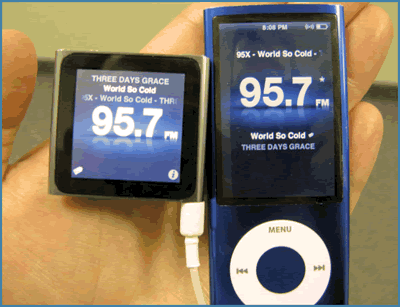 RADIOTEXT+
– if you have been following the industry news in the past
two years in the U.S., you may have heard of RadioText + (RT+).
RT+ is a data stream you can add to your RDS encoding that classifies
various characters within the text you are encoding in your RadioText
(RT). Until the RT+ standard was developed, there was no way to
know what that data was from a hardware or software standpoint,
and this is important for song tagging. RT+ gives us the ability
to classify types of information (such as title) and their location
within the RT message. Shown in the photos are the fifth (at right)
and sixth (at left) generation iPod Nano devices that are using
RT+ to parse a song’s title/artist/album from the RT data stream.
The iPod gives you the ability to “tag” the song for later
download by pressing and holding the center button. The next time
you connect your Nano to your computer and launch iTunes, you can
view your tagged songs and buy them.
RADIOTEXT+
– if you have been following the industry news in the past
two years in the U.S., you may have heard of RadioText + (RT+).
RT+ is a data stream you can add to your RDS encoding that classifies
various characters within the text you are encoding in your RadioText
(RT). Until the RT+ standard was developed, there was no way to
know what that data was from a hardware or software standpoint,
and this is important for song tagging. RT+ gives us the ability
to classify types of information (such as title) and their location
within the RT message. Shown in the photos are the fifth (at right)
and sixth (at left) generation iPod Nano devices that are using
RT+ to parse a song’s title/artist/album from the RT data stream.
The iPod gives you the ability to “tag” the song for later
download by pressing and holding the center button. The next time
you connect your Nano to your computer and launch iTunes, you can
view your tagged songs and buy them.|
EAS-CAP On-line Town Hall WHAT: Analyzing
the EAS NPRM: A Town Hall Discussion The National Alliance of State Broadcasters Associations (NASBA)-National Association of Broadcasters (NAB) Emergency Alert System (EAS) Committee is pleased to announce the third in a series of webinars on the implementation of the Common Alerting Protocol (CAP). "Analyzing the EAS NPRM: A Town Hall Discussion" will be presented on Thursday, June 16 at 4 p.m. EST. The one-hour session will feature a summary of the major components of the FCC's EAS Further Notice of Proposed Rulemaking (NPRM), as well as provide an opportunity for participants to ask questions. Information about the upcoming Town Hall will be available soon here. The NASBA-NAB EAS Committee is coordinating webinars and the Web site to provide resources for broadcasters and our EAS partners in implementing CAP by the September 30, 2011 deadline. To participate in this webinar, go to www.EASalert.org a few minutes before the presentation is scheduled to air. Once on the Web site, click "Go To the Town Hall," where you will be prompted for your name, affiliation and email address. This information will be collected to keep you informed about future events in this series and will not be sold or shared with outside parties. If you are
unable to participate in the live town hall on June 16, it will
be archived at www.EASalert.org
within 72 hours of the presentation. FCC
to Conduct Training for Consultants on Communications Towers and
Environmental/Historic Preservation Compliance For additional information contact Steve DelSordo and to register contact James Swartz who are both at the FCC. To attend the session you must preregister. The 2011 Radio Show Engineering Program
The
Radio Show is jointly produced by NAB and the Radio Advertising
Bureau (RAB). The Radio Show will include an enhanced schedule
and expanded Radio Show Marketplace featuring exhibitor booths.
The show program will also include a complete session schedule
focusing on current issues impacting radio. Early bird registration,
a $200 savings over on-site registration, expires on July 3.
The June 13, 2011 Radio TechCheck is also available in an Adobe Acrobat file. Please click here to read the Adobe Acrobat version of Radio TechCheck. |
 This
year's
This
year's 

ADVERTISEMENTS